
Create Dynamic Digital Signage with Zoned Content Layouts for Multi-Zone Display
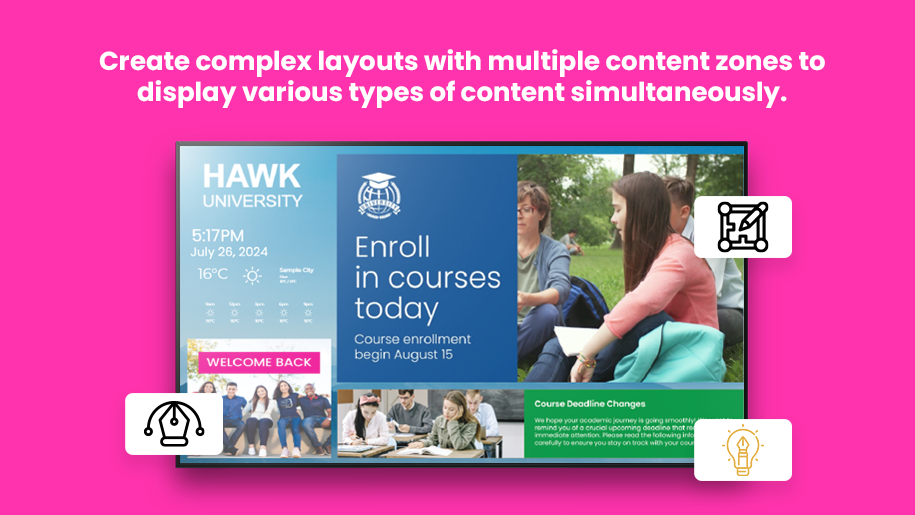
Zoned Content Layouts in firmChannel’s platform refer to the ability to create and manage multiple content zones within a single screen layout. This feature allows users to display different types of content simultaneously, providing a dynamic and engaging viewing experience.
Overview of Zoned Content Layouts for Digital Signage
Maximize the impact of your digital signage with firmChannel’s Zoned Content Layouts feature. This powerful tool allows you to create complex layouts with multiple content zones, enabling you to display various types of content simultaneously on a single screen. Whether you want to show videos, images, text, or interactive widgets, zoned content layouts provide the flexibility and control you need to deliver dynamic and engaging digital signage experiences.
Flexible Multi-Zone Layouts for Custom Digital Signage Displays
- Flexible Design: Create layouts with multiple content zones to display different types of content side by side. This allows you to present a mix of videos, images, text, and widgets all on one screen.
- Customizable Zones: Customize the size, position, and shape of each content zone to fit your specific design needs. Adjust zones to create a balanced and visually appealing layout.
- Content Variety: Use different zones to display a variety of content types, ensuring your audience receives a rich and diverse viewing experience.
Independently Control and Schedule Content for Each Zone
- Individual Zone Control: Manage content in each zone independently, allowing for precise control over what is displayed and when. Update or change content in one zone without affecting the others.
- Scheduled Content: Schedule content for each zone independently, enabling you to tailor your messaging and timing to different segments of your audience.
- Interactive Elements: Include interactive widgets in specific zones to engage viewers and provide additional functionality, such as touch screens or clickable links.
Customizable Layout Designs with Drag-and-Drop Tools
- Templates and Custom Designs: Start with pre-designed templates or create your own custom layouts from scratch. Our platform offers a variety of templates to suit different industries and use cases.
- Drag and Drop: Easily design and adjust your zoned layouts using our intuitive drag-and-drop interface. Quickly position and resize content zones to achieve the perfect layout.
- Visual Enhancements: Enhance your content zones with borders, backgrounds, and other visual elements to create a polished and professional appearance.
Make Real-Time Content Updates and Automate Zone Refresh
- Instant Changes: Make real-time changes to your zoned layouts and see the updates instantly on your digital signage screens. This allows for quick adjustments and immediate feedback.
- Automated Refresh: Set zones to automatically refresh their content at specified intervals, ensuring your information is always up-to-date.
Scale Zoned Layouts Across Multiple Displays and Video Walls
- Multiple Displays: Use zoned content layouts across multiple displays, from single screens to video walls. Ensure consistency and coordination across all your digital signage.
- Remote Management: Manage and update your zoned layouts remotely, providing flexibility and convenience for large-scale deployments.





FAQ
Frequently Asked Questions (FAQs)
What is a zoned content layout?
How do I create a zoned content layout?
Can I control the content in each zone independently?
Can I schedule content for individual zones?
How do real-time updates work with zoned content layouts?
Request a demo today!
Elevate your digital signage with firmChannel’s Zoned Content Layouts. Request a demo today to explore how our platform can help you create dynamic and engaging content that captivates your audience.