
Create more for every customer.
AI Widgets help you quickly create dynamic content for customer needs, from branded promotions and weather to live data.
- Create content faster
- Adapt to customer needs
- Deliver dynamic experiences
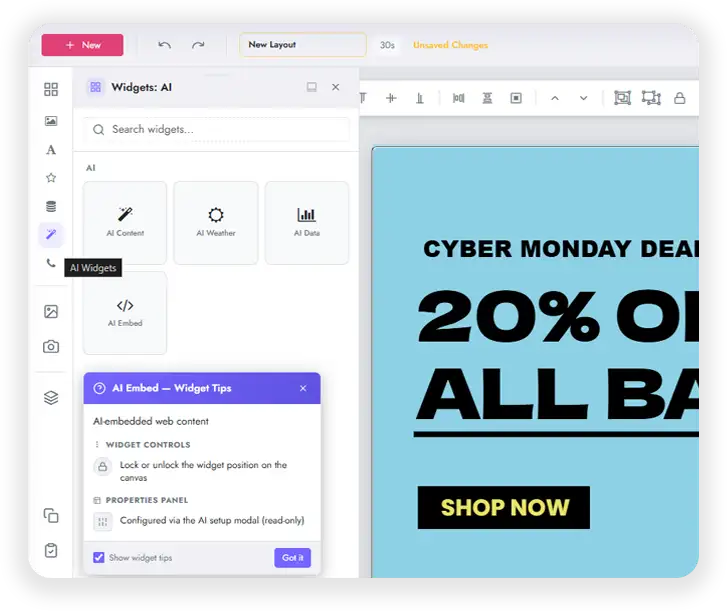
Four AI Widgets. Endless possibilities.
AI Content
Generate complete layouts for announcements, promos, welcome screens, menus, and more.
AI Weather
Create custom weather displays using your configured locations, including current conditions and forecasts.
AI Data
Turn connected datasets from Google Sheets, Excel, SFTP, and CSV into charts, lists, and dashboards.
AI Embed
Generate embedded experiences including web content, social feeds, iframes, and custom code from a simple prompt.
Describe it. Generate it. Refine it.
AI Widgets share one streamlined content generation experience designed to make creating and refining signage faster.
Data Aware
See available datasets and configured weather locations from the start.
Self Correcting
Generated content goes through automatic QA passes that identify and fix issues before it is applied.
Interactive
When more information is needed, AI asks clarifying questions instead of guessing.
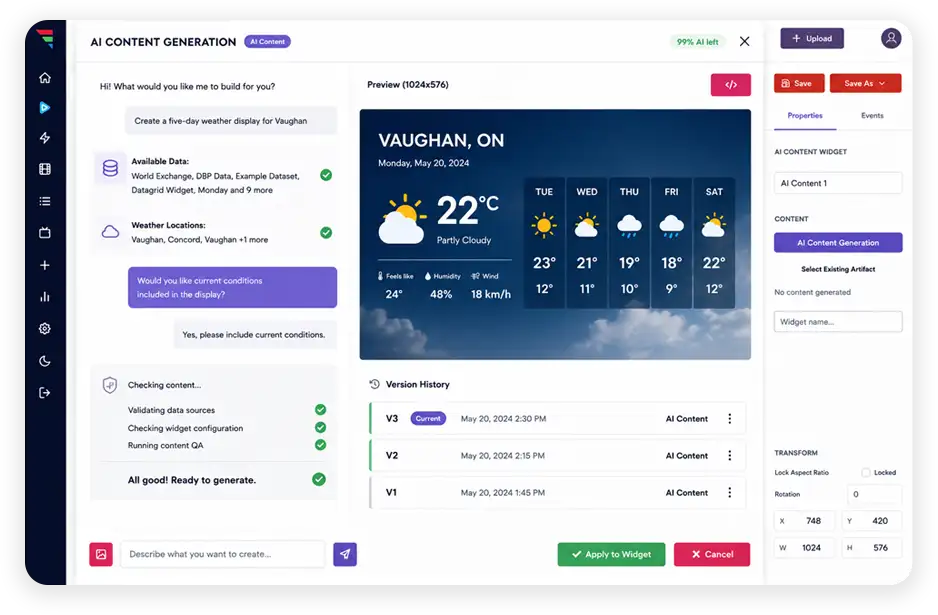
Start with AI. Stay in control.
Start with AI, then stay in control of the final result. Use one click Fills and canvas sizing, or open the HTML code view when you want to adjust generated content yourself.
Your prompt
Create a five day weather display for Toronto.
AI Weather
The widget reads your configured locations and builds the display.
Generated display
Current conditions plus a five day forecast, ready to refine.
Learn more about AI Widgets
What are AI Widgets?
AI Widgets are widgets you add to a layout that build their own content from a prompt. You describe what you want on screen, the widget generates it, and you can refine the result or edit it by hand before it goes live.
Which AI Widgets are available?
There are four. AI Content generates complete layouts such as announcements, promos, welcome screens, and menus. AI Weather builds weather displays from your configured locations. AI Data turns connected datasets into charts, lists, and dashboards. AI Embed generates embedded experiences from web content, social feeds, iframes, and custom code.
Where does AI Data pull information from?
From the datasets you have already connected, including Google Sheets, Excel, SFTP, and CSV sources. AI Widgets show you which datasets and weather locations are available before you generate anything.
Can I edit what the AI generates?
Yes. Generated content is a normal widget once it is applied. Use one click Fills and canvas sizing for quick adjustments, or open the HTML code view when you want to change the generated content yourself.
How does it avoid generating something wrong?
Generated content goes through automatic quality passes that validate data sources, check the widget configuration, and fix issues before the content is applied. When something is unclear, the AI asks a clarifying question rather than guessing.
How do I get AI Widgets?
AI Widgets are part of firmChannel V9. Reach out through the Get Started link or book a demo and our team will show your team how they work.
Other V9 Features
Ready to create more for every customer?
See how AI Widgets help your team turn a short prompt into branded promotions, weather displays, live data visuals, and embedded experiences across every customer account.