
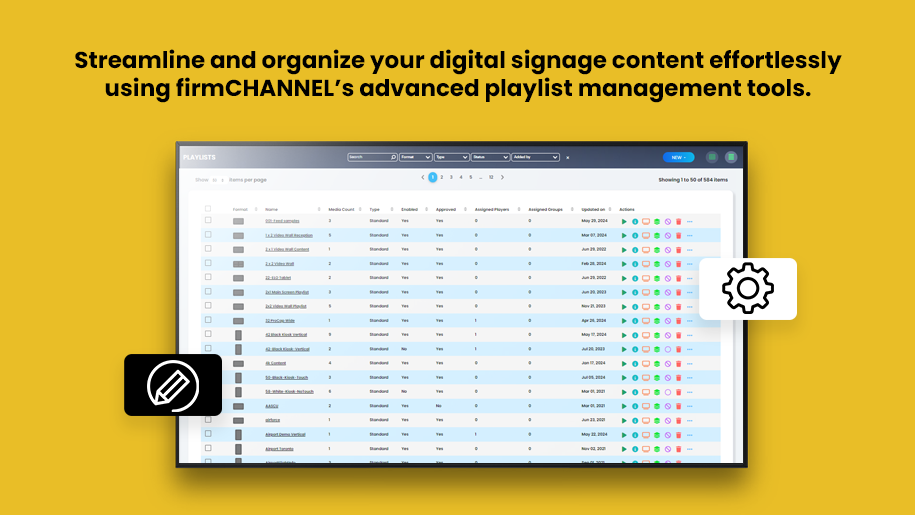
Customizable Playlist Management for Targeted Audience Engagement
Playlist Management is the strategic process of curating, organizing, and scheduling digital signage content to maximize audience engagement and message effectiveness. As a key function of digital signage, it allows you to design and deploy content sequences tailored to specific times, locations, and audience demographics. Advanced playlist management tools enable dynamic updates, rules-based content delivery, and seamless automation, ensuring that your messaging is timely, relevant, and consistent it always attracts attention
Overview
Use firmChannel’s advanced playlist management tools to manage and optimize your digital signage content. Our flexible platform allows you to create, organize and automate your content playlists, ensuring your message is delivered to the right audience at the right time.

Easy Playlist Creation
- User-friendly interface: Create playlists quickly with our intuitive interface. Download and upload videos, photos, documents, and more to create a series of fun content effortlessly.
- Content variety: Add a mix of different media to your playlist to create rich and engaging content, such as videos, images, audio files, documents, and web pages.
Flexible Scheduling Options
- Schedule hourly: Schedule your playlist to play at a certain time every hour, ideal for content that needs to be updated frequently.
- Daily format: Set playlists to take place at specific times of the day, and make sure your audience finds the right content during the day.
- Weekly schedule: Plan your content for the week, making sure to deliver consistent messages on different days.
- Monthly and annual schedules: Schedule content to specific days or months, perfect for recurring news, promotions, or seasonal events.
Custom Schedules
- Scheduling: Create custom settings to meet your specific needs, allowing you to precisely control when and how content will be released.
- Event-based planning: Trigger content to be created based on specific events or situations, and ensure timely and relevant messaging.
Recurring Playlists
- Automatic replay: Set replay playlists to automatically replay content on a preset schedule, eliminating the need for manual updates.
- Consistency and reliability: Ensure that important messages are consistently delivered without risk of being overlooked.
Dynamic Playlists
- Rule-based content: Create dynamic compositions based on logical rules rather than sequences. This allows them to display content based on specific criteria, such as time of day, audience size, or environmental conditions.
- Automatic updates: Dynamic playlists automatically update their content based on the rules you set, ensuring that your brand always displays relevant and timely content.
Tag-Based Content Inclusion/Exclusion
- Content filtering: Add or remove content from playlists based on tags associated with media assets in the content library. This allows for precise control over which content is displayed, ensuring relevance and appropriateness.
Organized Content Management
- Folder-based playlists: Use folder-based playlists to better categorize and organize your content. Easily navigate through your content library and add items to playlists.
- Set and Forget: Use a “set and forget” function to automate your content creation. Once you’ve created and scheduled your playlists, they will run automatically without the need for manual intervention.

Targeted Content Delivery
- Location-Specific Playlists: Create player location-based playlists to deliver content specific to each screen or location. Ensure the right message reaches the right audience.
- Dynamic content assignment: Automatically update playlists based on player location, making it easy to manage content across multiple screens and locations.
Quick Setup
- Quick deployment: Use Express View to quickly allocate players and resources, simplify setup and deploy your digital logo faster.
- Efficiency: Simplify player content management with an intuitive interface that allows for quick deployment and updates.
FAQ
Frequently Asked Questions (FAQs)
How can I create a playlist using firmChannel’s platform?
What types of content can I include in my playlists?
Can I schedule playlists to play at specific times or dates?
How do dynamic playlists work on the firmChannel platform?
Is it possible to target content to specific screens or locations?
Request a demo today!
Experience the efficiency and flexibility of firmChannel’s playlist management tools. Request a demo today to see how our platform can streamline your digital signage content management and scheduling.