
Real-Time Dashboard for Digital Signage | Live Monitoring & Management
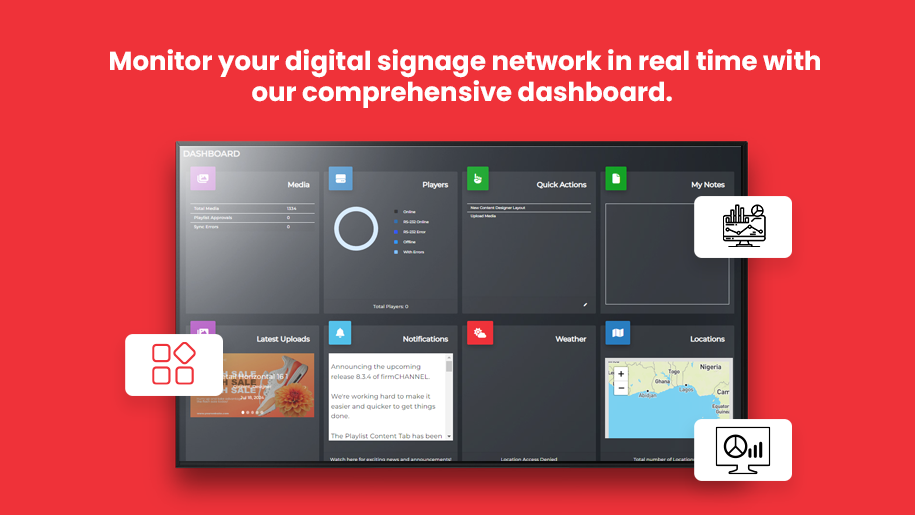
The Real-Time Dashboard in firmChannel’s platform is a feature that provides live data visualization and comprehensive monitoring of your digital signage network. It includes tools for tracking performance metrics, managing content playback, and ensuring player health, all through an intuitive and customizable interface.
Comprehensive Real-Time Monitoring for Digital Signage Networks
firmChannel’s Real-Time Dashboard is a powerful tool that provides comprehensive monitoring and management capabilities for your digital signage network. This feature allows you to visualize live data, track performance metrics, and manage content playback and player health, all through an intuitive and user-friendly interface. Enhance your operational efficiency and ensure your digital signage network is always performing at its best.
Real-Time Data Insights for Performance and Playback Monitoring
- Comprehensive Monitoring: View real-time data on your digital signage network, including player status, content playback, and overall performance metrics.
- Performance Metrics: Track key performance indicators (KPIs) such as uptime, content delivery success rates, and even viewer engagement.
- Instant Updates: Receive live updates on player activity and network health, enabling you to respond quickly to any issues.
Intuitive Dashboard Interface for Seamless Digital Signage Management
- Intuitive Navigation: The dashboard features a clean, intuitive layout that makes it easy to access and interpret data.
- Quick Access: Quickly navigate to essential information and tools, reducing the time needed to manage your digital signage network.
- Customizable Views: Tailor the dashboard interface to display the data most relevant to your operations, ensuring you have the insights you need at a glance.
Flexible Widgets for Personalized Data Visualization
- Tailored Data Display: Add and customize widgets to display specific data points and metrics that are important to your business.
- Flexible Layouts: Arrange widgets in a way that best suits your workflow and monitoring needs.
- Real-Time Data: Each widget displays real-time data, ensuring you always have the most current information available.
Proactive Alerts for Real-Time Issue Resolution
- Proactive Monitoring: Set up alerts for specific events or thresholds, such as player downtime or content playback failures.
- Instant Notifications: Receive instant notifications via email or SMS when an alert is triggered, allowing for quick action.
- Customizable Alerts: Define custom alert criteria based on your operational needs and priorities.
In-Depth Analytics and Reporting for Network Optimization
- Detailed Reports: Generate detailed reports on player performance, content playback, and viewer engagement.
- Historical Data: Access historical data to analyze trends and identify areas for improvement.
- Export Options: Export reports in various formats, such as CSV, for easy sharing and further analysis.





FAQ
Frequently Asked Questions (FAQs)
What kind of data can I monitor with the Real-Time Dashboard?
How do the alerts and notifications work?
Can I customize the dashboard interface?
What reporting capabilities does the Real-Time Dashboard offer?
How often is the data on the dashboard updated?
Request a demo today!
Discover how firmChannel’s Real-Time Dashboard can enhance your digital signage network management and operational efficiency. Request a demo today to see our dashboard in action and learn more about our powerful features.